TikTok
How to add TikTok to your system
These are your credentials with the platform, not Postiz credentials.
The keys on this page belong to a developer app you register with the platform. Nobody from Postiz will ever ask for them.
Keep them in your environment or a secret manager, never in a committed .env
file, and rotate them at the platform if they leak.
This integration requires that you have a TikTok developer account. It also requires that you have a public website, with https, and can upload files to that site to verify ownership.
TikTok will also not allow http:// for your app redirect URI, so you will need to be accessing Postiz from HTTPS.
NOTE: TikTok fetches media via pull_from_url. Your media files must be publicly reachable over HTTPS; localhost or private routes (e.g., /uploads) will fail. Expose your uploads via a reverse proxy (e.g., Caddy) or use object storage/CDN such as Cloudflare R2 with public access.
Ensure the media domain is listed under your TikTok developer account's verified sites.
TikTok approval is not the final step for Direct Post access. TikTok allows unaudited API clients to use the Direct Post API, but posts are restricted to private visibility until the API client completes TikTok's audit process for Terms of Service compliance.
If your API client has not passed this audit, TikTok also limits Direct Post usage to up to 5 users posting in a 24-hour window, and those user accounts must be private at the time of posting. See TikTok's Direct Post API developer guidelines for the current requirements.
In practice this means: before your TikTok developer app passes audit, the privacy_level setting for posts is forced to SELF_ONLY (private) regardless of what you choose in Postiz. Once your app is audited, all privacy levels become available.
Known issue: the /integrations/social/tiktok connect page can crash for some accounts. If you see a blank page or "cannot read properties of undefined" error, retry from a fresh incognito window. See Known Issues.
Create your app
Go here: https://developers.tiktok.com/apps
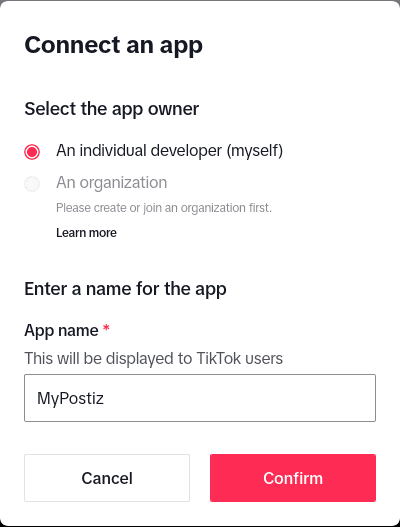
- App Name:
MyPostiz - Redirect URI: (see below)
The OAuth2 Redirect URI is the location where the provider will redirect to after a successful login. This needs to be set to your Postiz FRONTEND_URL + /integrations/social/ + {provider}.
You only need to set one OAuth2 Redirect URI when you are setting up your Postiz app.
Your TikTok OAuth2 Redirect URI:
- Production:
https://your-postiz-domain.com/integrations/social/tiktok - Local development (HTTPS required):
https://localhost:4200/integrations/social/tiktok - Docker (HTTPS required):
https://localhost:5000/integrations/social/tiktok
Set a TOS and Privacy Policy
This needs to be on a public domain that you have access to, that is hosted on HTTPS.
Tick "Web" for your platforms.
Add apps
Add the "Login Kit" and "Content Posting API" to your app.
For "Login Kit", set the redirect URI to http://localhost:4200/integrations/social/tiktok
For Content posting API, enable "Direct Post".
Add scopes
Add the following scopes:
- user.info.basic
- video.create
- video.publish
- video.upload
- user.info.profile
Copy your client secret to environment variables
These can be found immediately after registering your application. The client ID is 16 characters long and the secret is 32 characters long.
TIKTOK_CLIENT_ID=1234567890123456
TIKTOK_CLIENT_SECRET=12345678901234567890123456789012
Restart Postiz with the updated environment variables
Add a TikTok channel in the Postiz web interface
Go to the Postiz web interface, and click on the "Add Channel" button. Select "TikTok" from the list of available channels. You should be redirected to TikTok to authorize the application.
Posting settings
When composing a TikTok post, the "How do you want to post?" setting decides which other settings apply:
- Post directly to TikTok publishes the post and applies all the settings below.
- Upload without posting does not publish: it sends the media to the account's TikTok app inbox, where the owner must finish and publish it manually within 24 hours or it is discarded. TikTok keeps only the post content/title in this mode, so the settings panel collapses to hide the other settings while it is selected.
Some settings also depend on the media type:
- Allow Duet, Allow Stitch, and Video made with AI apply to videos only, TikTok has no equivalent for photo posts.
- Auto add music applies to photos only.
- Privacy level, comments, and the branded-content toggles apply to both videos and photos.